Why growing teams outgrow Asana
Asana works well as a task manager. But once documentation, decisions, and automation live in other tools, your team starts stitching context together. Vaiz turns that fragmented workflow into one operational core.


When Asana stops being enough for growing teams
Why scattered context quietly slows growing teams down
For growing teams, context switching compounds quickly once work, docs, and decisions stop living in the same operational flow. The more often people reconstruct context across multiple tools, the harder it becomes to keep execution moving cleanly.
Asana handles task management well, but deeper documentation and knowledge systems usually end up living in tools like Notion or Confluence. Once the team starts stitching those layers together manually, execution slows down and the full context becomes harder to recover.
The fragmented approach
Asana works well for tracking tasks. The challenge appears when documentation, decisions, and process logic start living elsewhere. That leaves teams working across multiple surfaces instead of one connected operational flow.
The Vaiz ecosystem
Vaiz offers a different path. It becomes the operational core where tasks, documents, decisions, and automation stay connected. Your team can still use familiar interfaces around it, but the source of truth no longer has to be scattered.
In this article, we'll break down what changes when task management, documentation, and automation share the same operational center. We'll show which workflows happen directly inside Vaiz, and how external tools can still connect to the same source of context without fragmenting the system.
And this isn't theory. We'll show how our own company, including every department from engineering to legal, works in Vaiz every day. Because the best argument for a product is when its creators trust it with their own business.
Chapter 1. Task management: Less noise, more substance
Open any task tracker and you quickly see the trade-off it makes. Some tools overload the interface with metadata and controls. Others stay clean, but become rigid once teams need richer workflow structure. In both cases, the friction appears when the tool starts shaping the process more than the process shaping the tool.
Clean board design
In Vaiz, Kanban boards are designed differently. Tasks flow top to bottom, separated only by a thin line, with no heavy "card" frames eating up screen space. This isn't just an aesthetic choice: a clean interface reduces visual fatigue and lets you focus on content rather than decoration. When your team spends several hours a day in the tracker, this matters.
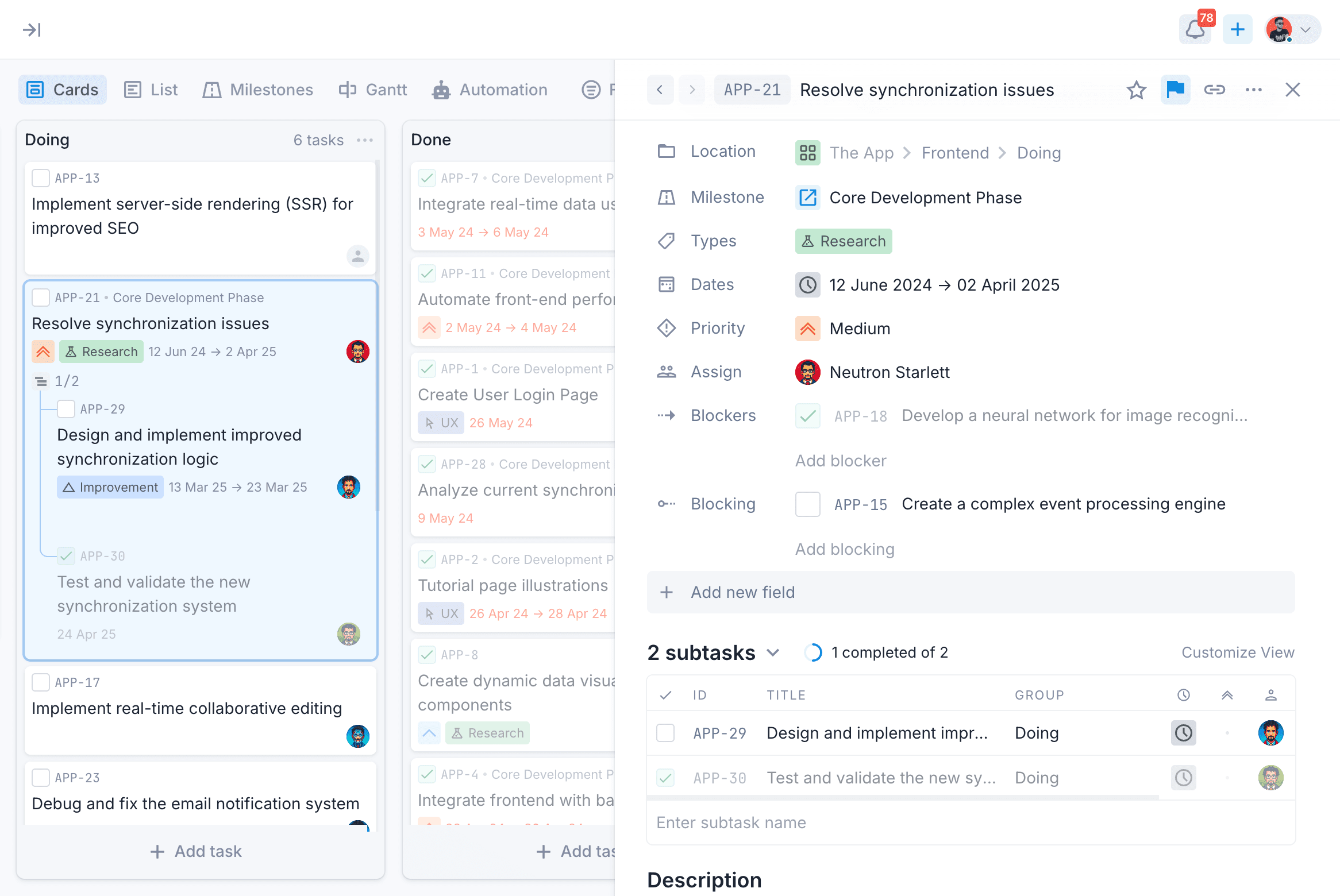
WIP limits: Overload control
One of the most underrated project management practices is limiting Work In Progress. In Vaiz, you can set a maximum number of tasks in any column. When the limit is exceeded, the system signals it visually. This lets you instantly identify bottlenecks: if the "Code Review" column consistently has more tasks than allowed, the team needs to redistribute resources. WIP limits aren't a restriction. They're a tool for preventing burnout and chaos.
Independent subtasks
In many trackers, subtasks stay tightly bound to a parent item. That works for simple checklists, but becomes limiting once work branches across teams or boards. In Vaiz, subtasks are fully autonomous. They can be detached from the parent, moved to a different board, assigned to another person, and even have their own subtasks, with infinite nesting without artificial limitations. A task like "Run A/B test on the payment button" can start as a subtask in a design project and later move to the development board without losing history or context.
Custom fields
Every team works differently, and universal fields like "Status / Priority / Assigned" only cover basic needs. Vaiz supports custom fields in any format: time estimates, links to other tasks, checkboxes, numeric values, dates, dropdown lists. You design the task card to fit your process, rather than adapting your process to the tool's limitations.
What this means for business:managers see the real picture of team workload without daily standup interrogations. Tasks don't hide inside subtasks, limits prevent overload, and custom fields let you track exactly the metrics that matter to your business.
Chapter 2. Documentation: A knowledge base that lives inside your tasks
In Asana, a task description is still a fairly lightweight context layer. Need a richer spec? Teams often move it into Notion, Google Docs, or another knowledge tool and paste a link back. Need a diagram? Open Miro. Need a structured table? Open Sheets. Each step adds another context switch.
In Vaiz, documents and the knowledge base are the core of the system, not an add-on.
Block editor
The built-in editor in Vaiz is a full-featured tool for creating documentation of any complexity. You can build documents from blocks: from simple headings and lists to complex structures like column layouts (Columns), collapsible sections (Details), and code blocks with syntax highlighting. All of this is available both in standalone knowledge base documents and directly in task descriptions. A feature spec, an architecture document, a QA checklist. Everything lives where the team actually works.
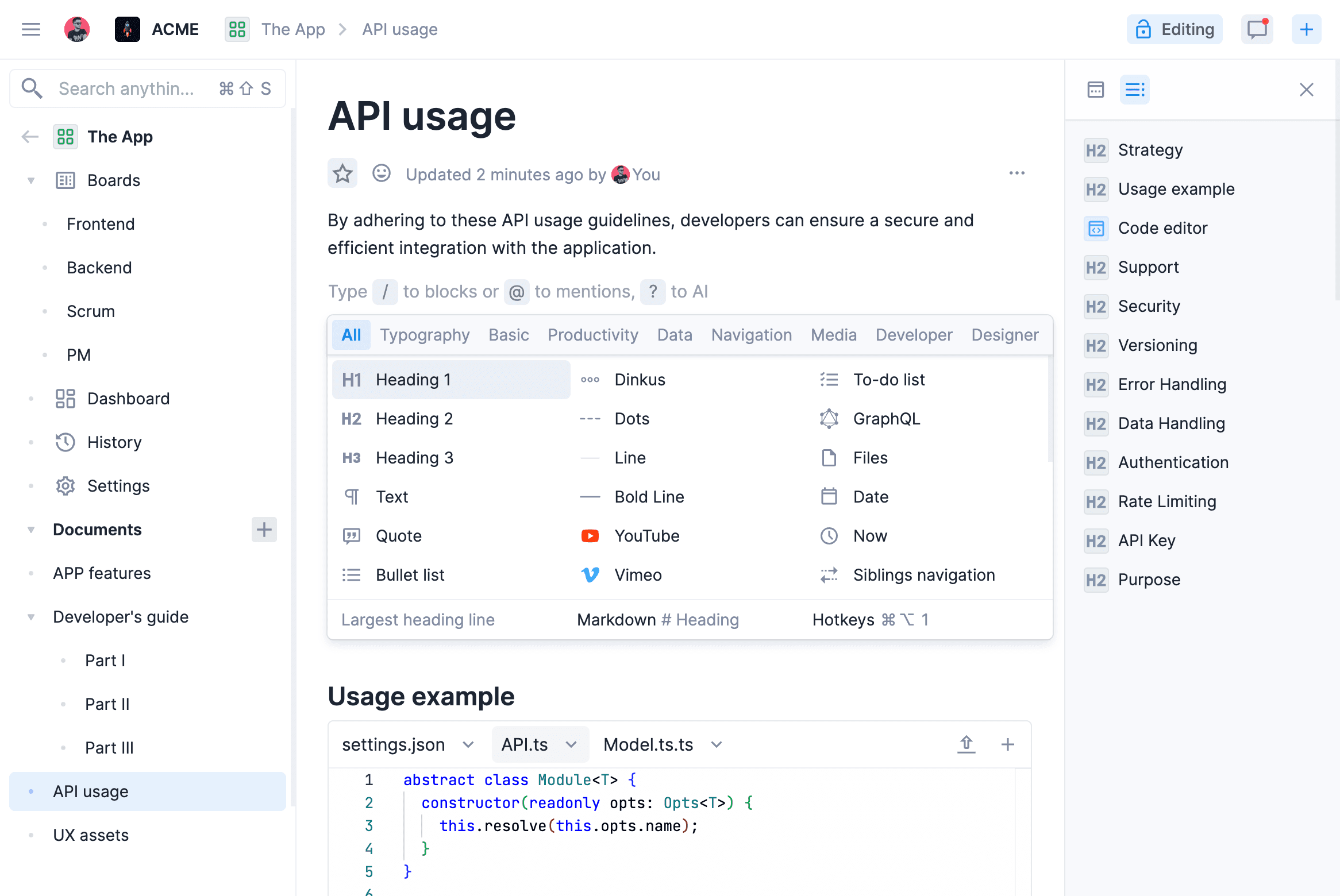
DataGrid: Tables with typed data
DataGrid deserves special mention: advanced tables with typed fields. This isn't just a grid of rows and columns. Each column can have its own data type, such as numbers, dates, boolean values (yes/no), multiline text, user lists from your workspace, and even custom lists with icons for displaying progress. Data in the table can be sorted in place. For most information structuring needs, from content tracking to contract registry management, DataGrid provides enough power to avoid reaching for a separate spreadsheet tool.
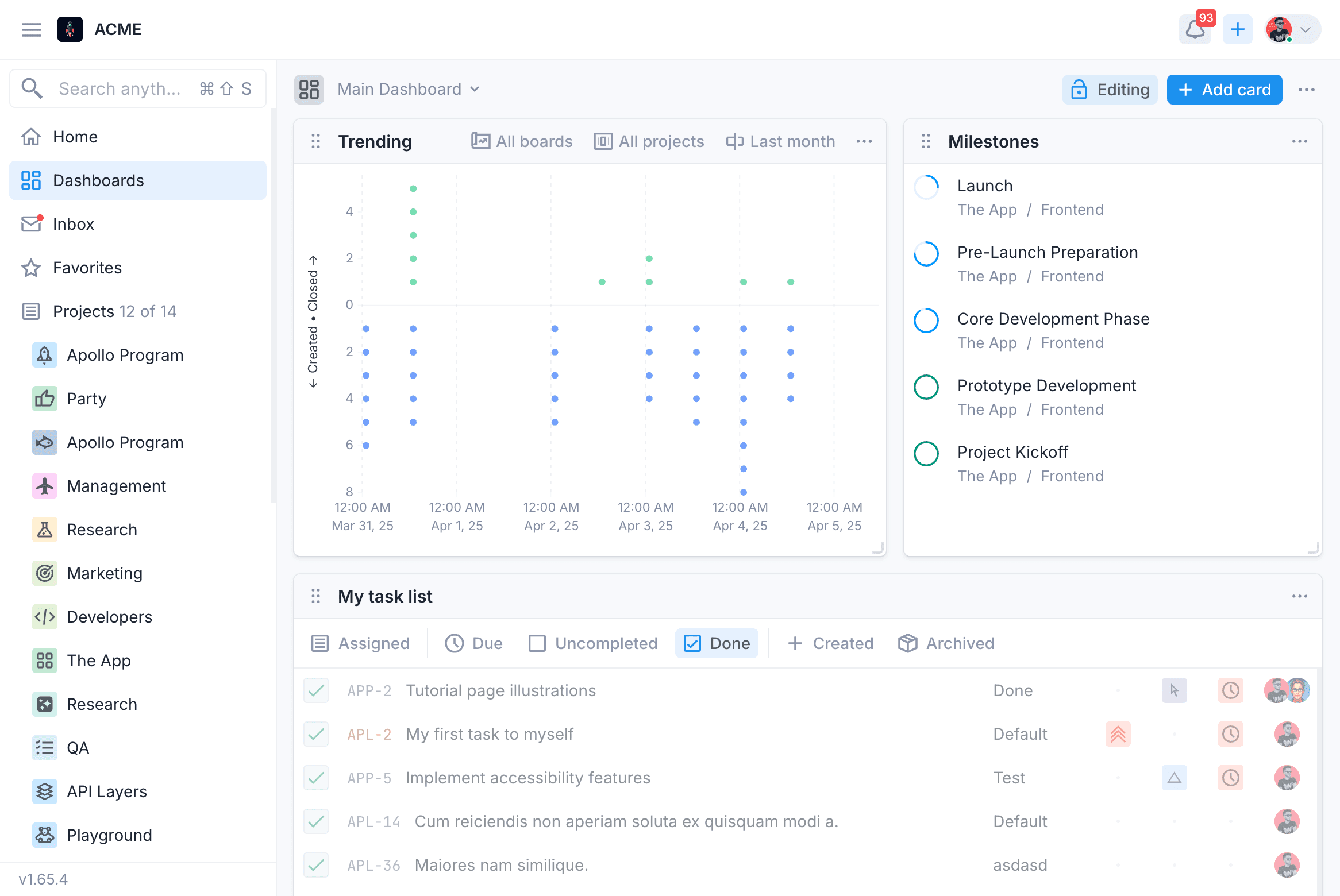
Media and external content
You can interactively embed Figma mockups, Miro boards, YouTube and Vimeo videos, and CodeSandbox environments directly into a document or task description. Not as a link you need to open in a new tab, but as a live widget. The designer sees the mockup, the developer sees the code sandbox, and the marketer sees the video, all in the context of a single task.
Inline discussions
Imagine: you're reading a specification and stumble upon an unclear paragraph. In Notion, you'd leave a comment somewhere on the side and hope someone notices it. In Vaiz, you highlight a specific word or text fragment and start a threaded Discussion attached to it. When the issue is resolved, the discussion is marked "Resolved" and archived, without cluttering the document text. The full history is preserved but doesn't interfere with those reading the document after you.
What this means for business:a new employee no longer needs to assemble the full context across several disconnected services before they can move forward. Onboarding speeds up, knowledge isn't lost when teams change, and paying for fewer overlapping tools saves budget.
Chapter 3. Artificial intelligence as a team member
AI in Vaiz isn't positioned as a chatbot tucked in the corner of the screen that you need to specifically address. It's designed as an assistant that can work across boards, tasks, documents, change history, and comments. It can help create tasks, generate reports, and analyze data as part of the workspace rather than as a separate add-on surface.
Here's how managers and teams use the AI assistant every day.
Use case 1: Manager's morning briefing
A project manager's morning typically starts with a ritual: open the tracker, scan the boards, check filters, look through notifications. This takes 10-15 minutes, and that's an optimistic estimate.
In Vaiz, you simply type in the AI chat: "Give me a morning summary: what changed yesterday on the Mobile App project, are there any blockers, and what's overdue?"
You get a structured report: which tasks were completed yesterday, which are blocked and by whom, and which deadlines were missed, with direct links to each task. A clearer picture of the day without manually clicking through every board first.
Use case 2: Catching up after vacation
Coming back from a two-week vacation and opening the work tracker is a test for the nervous system. Dozens of notifications, new assignments, shifted priorities, missed discussions.
Instead of spending a long stretch parsing your inbox, you write: "I'm back from vacation. Show me all my tasks, what changed in the last 2 weeks, any new assignments, what's overdue."
AI gathers your tasks, analyzes the change history over two weeks, checks notifications, and delivers a summary: where you were mentioned, what requires immediate attention, and which tasks can wait. You get back into context much faster, without re-reading everything from scratch.
Use case 3: Automatic report generation for stakeholders
Preparing a monthly report for leadership is usually half a day of routine: exporting data, grouping by weeks, calculating metrics, formatting charts.
In Vaiz you write: "Prepare a report for the Redesign project for the last month: how many tasks were closed, weekly dynamics. Build a chart and generate a CSV."
AI analyzes the project tasks, groups them by week, generates a visual dynamics chart, and produces a CSV file ready for download. The report that used to require manual compilation becomes much faster to prepare.
Use case 4: Discussion summarization
A task has accumulated 50 comments. Three different solutions were discussed in parallel, someone changed their position, someone proposed a compromise, and you've already lost the thread.
Instead of re-reading the entire thread, you click the Summarize button in the comments tab. AI analyzes the discussion and delivers a structured summary: key decisions that were made, open questions that remain unanswered, and action items with specific steps that need to be taken. Five minutes of reading compressed into 15 seconds.
What this means for business: the AI assistant can meaningfully reduce routine work around status gathering, report preparation, and notification review. The more coordination-heavy the team, the more valuable that time recovery becomes.
Chapter 4. Interactive AI chat: Not just text, but a working tool
Most AI assistants in work tools produce text responses. Ask a question and get a paragraph of text. Useful, but limited.
The AI chat in Vaiz works differently. It can generate interactive outputs right inside the chat window. Not just a static image or a screenshot, but live, clickable elements you can work with on the spot.
Charts and diagrams
Ask AI: "Show the team workload for the current sprint," and an animated bar chart with task distribution by team member appears right in the chat. Not a link to an external dashboard, but an interactive chart you can explore on the spot. Hover over a bar to see the details. In many teams, this is the kind of visualization that would otherwise push people toward a separate dashboard or BI layer.
Sortable task lists
"What tasks are overdue in the Backend project?" The chat shows not just a text list, but an interactive table. Tasks can be sorted by date or priority; click on any one and jump straight to it. This is closer to a mini-app inside the chat than a typical text response.
Clickable actions
AI doesn't just display information. It offers actions. See an overdue task in the list? You can change its priority or reassign it right there, without leaving the chat window. The line between "ask AI" and "do it" practically disappears.
On-the-fly mini-apps
Need to quickly compare two teams' performance for a sprint? Ask, and AI builds a comparative chart. Want to see how the backlog volume changed over the last quarter? Get a trend line with data points. Each such request creates a small task-specific view tailored to your question. Instead of preparing a dedicated dashboard first, you can ask for the view you need in the moment.
Why this matters
A typical AI chat is question-and-answer. The AI chat in Vaiz is a work surface. A manager can complete their entire morning routine (checking statuses, analyzing workload, identifying problems) without leaving one window. No need to switch between boards, filters, and dashboards. AI brings the right information in the right format directly to you.
What this means for business:the interactive chat turns AI from a "smart reference guide" into a full-fledged command center. Instead of hunting through scattered dashboards and status screens, teams get one place where they can analyze, make decisions, and act on shared context.
Chapter 5. @vaiz in comments: An AI agent right in the discussion
If the AI chat is a separate space for dialogue with the assistant, then @vaiz in comments is AI that comes to where the real work happens.
The concept is simple and familiar to anyone who's used @grok on X.com: you write a comment on a task, mention @vaiz, and the assistant joins the discussion right in context. It sees the task, its description, attached documents, and the entire comment thread.
How it works in practice
Say your team is discussing an approach to implementing a new payment module in the task comments. The discussion has dragged on, opinions have diverged. You write: "@vaiz, summarize the discussion and suggest three solution options considering the requirements from the specification document."
AI reads the entire comment thread, references the attached specification document, and responds right in the same thread with a discussion summary and three reasoned proposals. The team continues discussing with concrete material on the table. And @vaiz doesn't just see the current task. It has access to the entire project context: other boards, knowledge base documents, change history. It can cross-reference the current discussion with decisions made in related tasks or cite an architecture document that lives in a completely different section of the space. That makes it meaningfully different from a simple chatbot that only knows what you wrote in a single conversation.
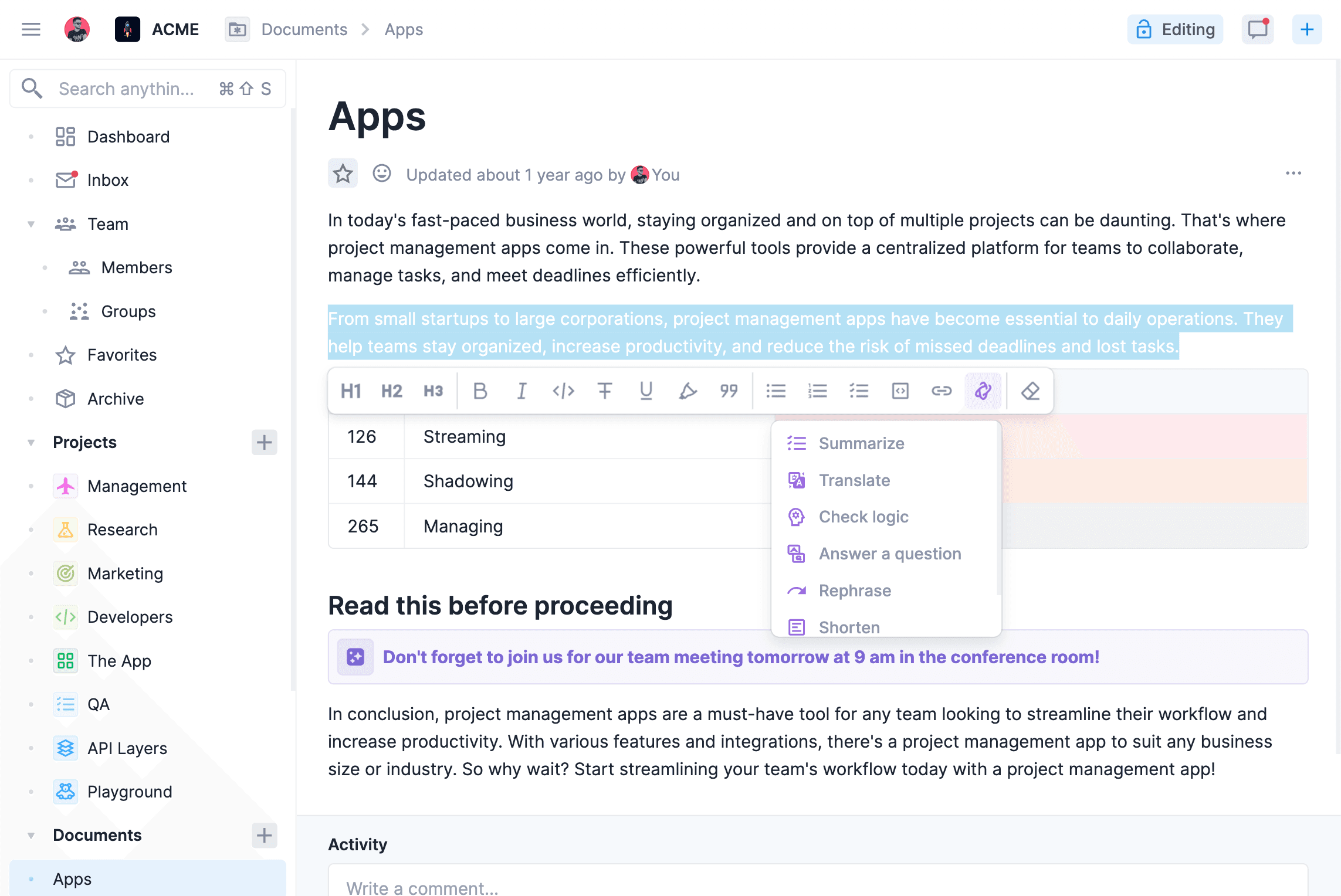
Another scenario: a QA engineer is testing a feature and encounters unexpected behavior. They write in the comments: "@vaiz, check the task description. Is this a bug or intended behavior?" AI compares the behavior with the requirements from the description and provides an answer with a quote from the specification. Instead of waiting for a response from the task author (who might be in a different time zone), QA can get an answer much faster.
Why this is more important than a separate chat
Context is everything. When you go to a separate AI chat, you need to explain the situation from scratch: "Here's the task, here's what was discussed, here's what I want to know." When you invoke @vaiz right in the comments, the context is already there. AI sees the task, the board, the documents, and the discussion. The switching costs become much lower.
For distributed teams, this is critically important: @vaiz becomes the connective tissue that helps participants from different time zones stay in context and make decisions faster.
Scenarios where @vaiz is indispensable
- A manager is reviewing a task that was led by a departed employee. The documentation is incomplete, comments are fragmented. They write: "@vaiz, reconstruct the context for this task: what was done, what decisions were made, what's left." AI gathers information from the description, comments, and change history, then delivers a coherent summary.
- A designer uploaded a mockup to a task and wants quick feedback from the team. While colleagues aren't online, they write: "@vaiz, compare this mockup with the requirements from the specification document. What might I have missed?" AI cross-references the mockup with the spec and points out potential discrepancies. Not a replacement for human review, but an excellent first filter.
Chapter 6. For developers: Vaiz + IDE via MCP
This chapter is primarily for technical teams, but if you're a manager, pay attention to the outcome: developers stop switching between IDE and browser, which means they write code faster and lose focus less often.
In many trackers, a developer still lives between two worlds: code is written in the IDE, while the broader task context is easier to manage in the browser. Open the tracker, read the spec, switch back to the editor, write code, open the tracker again, update the status, leave a comment. Even when integrations exist, that cycle still breaks concentration.
Vaiz does not require developers to abandon their IDE or preferred AI client. Instead, it makes Vaiz the source of truth that those tools can reach. Thanks to the built-in Model Context Protocol (MCP) server, Cursor IDE, Claude Desktop, and other MCP-compatible clients can securely access your boards, documents, and comments without duplicating context across systems.
Use case 5: Diving into task context without a browser
A developer sits down to work, opens the IDE, and instead of going to the browser to find the technical specification, simply types in the editor's chat: "Let's see how to solve task DEMO-32."
Cursor retrieves all data for the task from Vaiz via MCP. If the task contains a link to a specification, AI can read the attached document alongside the current project codebase and generate a code proposal more quickly. No copying text from the tracker. The developer gets a working starting point without leaving the editor.
Use case 6: Creating tasks directly from code (Code to Task)
A developer notices a code section that needs refactoring but doesn't have time for it now. They select the fragment and write: "Create a refactoring task for this module in the Backend project. Priority: Critical. Assign to David."
AI finds the right board, creates a task with the selected code in the description, sets the priority, and assigns the person. A card instantly appears in Vaiz, and the developer continues writing code without switching to a browser. The task won't get lost in notes or side conversations. It's in the system of record immediately.
Use case 7: Automatic decomposition of large features
A team lead uploads a comprehensive document to Vaiz, such as the architecture of a new billing system or a Game Design Document. Then in the IDE they ask: "Read the document 'Billing Architecture' in Vaiz. Identify 5 main development steps and create a separate task for each on the Sprint 24 board."
AI reads the document, analyzes the architecture, breaks it into logical steps, and can create the first set of backlog tasks. Work that would normally require a manual breakdown becomes significantly faster.
Use case 8: Managing statuses and blockers from the terminal
A feature is written, and the developer needs to hand it off for testing. In the IDE chat they write: "Move task PRJ-123 to the Ready for QA column and add a comment that the offline payment scenario needs to be tested."
AI moves the task to the right column on the board and leaves a comment for the tester. The task goes to QA, and the developer hasn't opened a single browser tab.
Another example: a developer realizes their task depends on another one. They write: "Mark task PRJ-123 as blocked by task BACKEND-45." AI sets the dependency between tasks in the system, and the blocker becomes visible to the entire team.
What this means for business: developers stay in flow longer. Reducing repeated IDE ↔ browser switches helps teams lose less concentration and spend more time moving the work itself forward.
Chapter 7. Process automation: Built-in rules, Slack, and Zapier
Routine kills productivity. Every manual action that could be automated is a potential bottleneck where a task can get stuck or lost. Vaiz offers automation at two levels: a built-in rules engine for internal processes and integrations with external services when your broader stack still needs to react to the same source of truth.
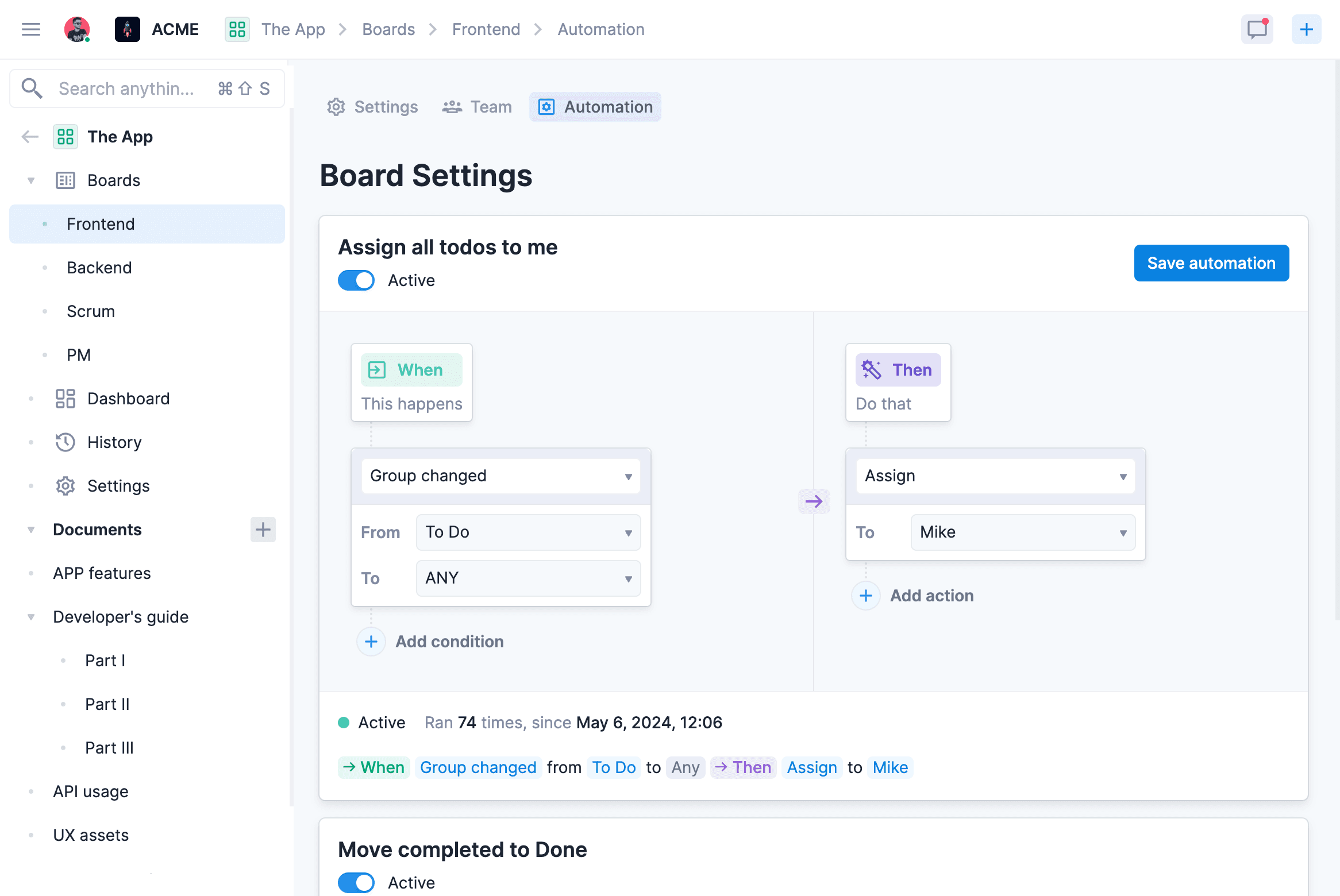
Built-in automation: When → Then
Right inside Vaiz, without connecting third-party services, you can create automation rules based on the principle "When X happens → Do Y." This is a built-in engine that operates at the board level.
Examples of rules that save time every day:
- When a task moves to the Done column → automatically assign a reviewer. No more manually pinging a colleague. The system takes care of the next step in the process.
- When a task's priority changes to Critical → send a notification to Slack.Critical issues don't drown in the stream of regular updates. The team learns about them instantly.
- When a task is created on the Bugs board → automatically set the type to "Bug Report" and priority to "High." Process standardization without manual field filling.
These rules can be configured quickly, require no programming knowledge for common cases, and run continuously. For many basic automation scenarios, teams do not need to reach for Zapier or another external tool first.
Asana offers automation, but the available depth and packaging depend more heavily on plan choice and setup. In Vaiz, it's available immediately and configured intuitively: select a trigger, select an action, save.
Slack integration
For teams that still communicate in Slack, Vaiz offers deep two-way integration, not just notifications.
The Vaiz AI agent is available right inside Slack: you can interact with it in any channel or direct message, just like @vaiz in task comments. It sees your workspace context and answers questions without making you open a browser. Slack remains the conversation surface, while Vaiz stays the place where task state, history, and documents are actually stored.
Use case 9: Turning a discussion into a task
A team discusses a problem in Slack: "The 'Forgot Password?' button on the login page isn't working in Chrome 120." The project manager clicks the three dots next to the message and selects Create Task from Message. A task is instantly created in Vaiz with the problem description, priority, and a link to the original discussion. The developer receives a notification, and the chain from problem discovery to work starting takes seconds, not hours.
Zapier integration
When your company still relies on external systems, Zapier helps Vaiz participate in those workflows without becoming just another disconnected tool. It lets outside triggers update the same operational record instead of creating parallel process silos.
Use case 10: Automatic client onboarding
The sales team closes a deal in HubSpot, and the status changes to "Contract Signed." A Zapier trigger automatically creates a task in Vaiz on the "Onboarding" board with client data. The implementation team sees the new card and picks it up, with no manual information transfer between departments, no risk of a client "getting lost" between CRM and tracker.
What this means for business: When → Then automation reduces repeated manual coordination. Tasks are less likely to stall between stages, critical issues are easier to surface, and cross-department processes can move with fewer handoff gaps.
Chapter 8. We use Vaiz ourselves: Every department, every day
There's a simple test for product maturity: does the team behind it use it for their own daily work? Not for demos or presentation screenshots, but for real processes, with real deadlines and real consequences for mistakes.
Vaiz passes this test with flying colors. Our parent company, across every department from engineering to legal, works entirely in Vaiz. This isn't a marketing ploy but an everyday reality: if something is inconvenient, we feel it first and fix it faster than a user can complain.
Engineering
The engineering team lives in Vaiz: sprints, Kanban boards, code review, planning. Through MCP integration, developers manage tasks directly from their IDE without switching to a browser. Architecture documents, API specifications, and deployment guides are stored in the Vaiz knowledge base and linked to specific tasks. When a new developer joins the team, they just need to open the board and documentation. All context is in place.
Marketing
Marketers plan content, maintain an editorial calendar, and track publication statuses in Vaiz. The important part is not that they use one interface forever, but that the underlying work and context stay in one place.
Imagine: a marketer is preparing a post about new product features. Instead of going to the tracker, filtering tasks, reading descriptions, and manually gathering information, they open Claude Desktop and write: "Gather data on all closed features from the past month in the Product project. I need material for a blog post." AI reaches Vaiz via MCP, collects completed tasks with descriptions, and delivers structured material. The marketer gets source material for an article much faster than gathering it manually.
Another example: "Check what tasks are currently in progress for the Redesign project. I need to prepare a social media announcement." Claude Desktop connects to Vaiz, reads the board, analyzes in-progress tasks, and suggests a draft announcement based on real project data. Claude is just the interface in this moment; Vaiz remains the system where the tasks, status, and supporting context actually live.
Yet another everyday scenario: a marketer is preparing a weekly client digest. Previously, this meant a manual process: open the tracker, find the right project, filter tasks for the week, read descriptions, formulate updates. Now: "Gather all completed tasks for this week in the Platform project, group by category, and write a draft client digest." Done. The marketer still edits the tone and adds details, but a large part of the first draft is already in place.
It's important to understand: the marketer doesn't need to understand APIs, MCP protocols, or integration setup. Claude Desktop connects to Vaiz once. After that, the marketer simply communicates with AI in natural language, while Vaiz stays the place where the underlying work data and knowledge remain anchored.
Finance
The accounting team manages budgets, payments, and internal deadlines in Vaiz. A payment request is a task: the amount, an attached invoice, and an approval chain are all in one card, not in email threads between departments. Invoice templates and procedures are in the knowledge base. Need the month-end closing procedure? It's found quickly, not hunted across someone else's Google Drive folders.
Legal department
Lawyers maintain contract registries, approval checklists, and document templates in Vaiz. Each contract is a task with an attached document, a deadline, and a responsible person. WIP limits help ensure a lawyer isn't overloaded with simultaneous approvals, and custom fields track the status of each document: "Under Review," "Revisions Made," "Signed."
Customer support
The support team tracks tickets on dedicated boards, uses an internal wiki as a product knowledge base, and quickly finds answers to customer questions through the AI assistant. When a customer reports a problem, a support engineer can ask @vaiz right in the ticket comments: "Have there been similar bugs before? How were they resolved?"and get an answer with context from previous tasks. When a ticket requires engineering involvement, the task moves to the engineering team's board without losing context or discussion history. The developer sees not just the bug description, but the entire customer conversation, with no information loss during handoffs between departments.
One operational core, different processes
The key reason all departments thrive in Vaiz is that it does not impose a single workflow while still keeping work in one operational core. Engineering can work in Kanban with sprints, marketing with simple lists and deadlines, and legal with checklists and custom statuses. Each department configures boards and fields for themselves, but everyone sees the big picture. This is a fundamental difference from the "one size fits all" approach that forces accounting to work in an interface designed for Scrum teams.
What this means for business:when all company departments work from one source of truth, information gaps shrink dramatically. Marketing knows which features are in progress. Sales knows when the product will be ready. Legal sees the deadlines. Support has access to up-to-date documentation. This isn't just convenience. it's a competitive advantage.
Chapter 9. Security and access control: Enterprise grade
For mid-size and large companies, choosing a new tool always means a conversation with the security department. Vaiz is designed so that conversation ends quickly: access control, secure authentication, predictable token behavior.
Passwordless authentication (Passkeys)
Vaiz supports biometric login via the WebAuthn standard, including FaceID, TouchID, and hardware security keys. Passwords that can be stolen, forgotten, or brute-forced are no longer needed. Passkeys are a standard adopted by Apple, Google, and Microsoft, and Vaiz supports it out of the box.
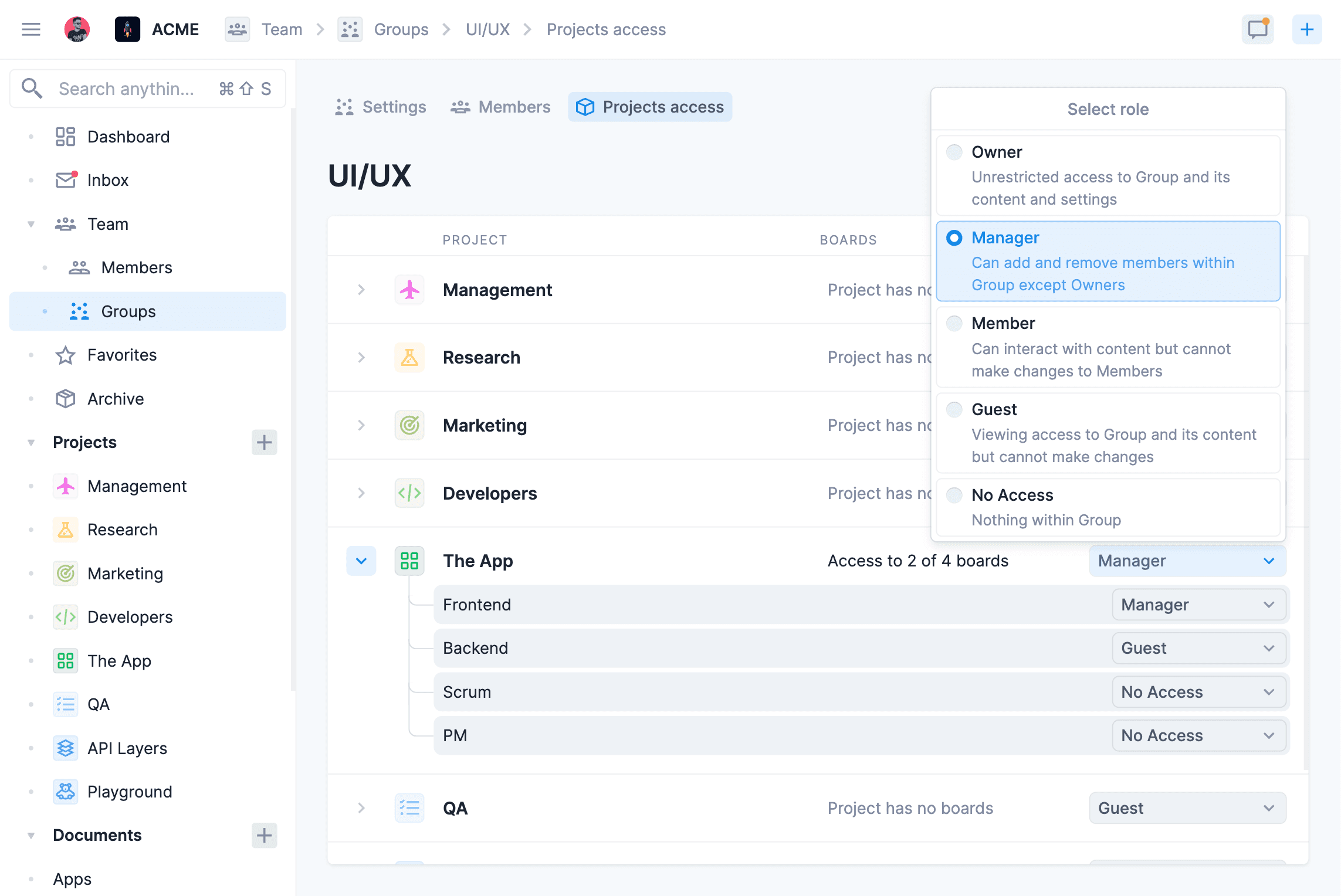
Role-based access control (RBAC)
Four access levels, Owner, Manager, Member, and Guest, cover typical scenarios from full control to limited viewing. But the real power is in Access Groups: you can group an entire department and grant project permissions with a single click. When a new marketer joins the company, you add them to the "Marketing Team" group, and they instantly get access to all the right boards and documents, without manually configuring each project.
SDK and API
Everything available in the Vaiz interface is accessible programmatically. REST API and SDK let you build any integration: sync with internal systems, custom dashboards, process automation. An access token is created in profile settings in seconds, and the same token is used for MCP connections to IDE and Claude Desktop.
What this means for business:security that doesn't slow down work. Passkeys eliminate the password problem, RBAC saves hours on access management, and the SDK lets you integrate Vaiz into any enterprise stack.
Chapter 10. Commercial model and stack fit: Vaiz vs Asana
When teams compare tools at scale, the real question is rarely a single headline seat price. The more important question is how much workflow context can stay inside one product before the team needs extra docs, AI packaging, admin layers, or workaround tooling around it.
Commercial comparison
| Parameter | Asana | Vaiz | Difference |
|---|---|---|---|
| Pricing model | Tiered plans; packaging varies by plan | Pro and Premium plans | Straightforward packaging in Vaiz |
| Docs and knowledge depth | Project docs; deeper knowledge often external | Built-in docs and DataGrids | Deeper native context |
| AI packaging | Included on paid plans, but shaped by Asana plan choice | Vaiz Agent included in Premium | Native AI workflow in Vaiz |
| Workflow context | Tasks are strong, but broader context often spreads outward | Tasks, docs, AI, and automation stay connected | One operational core |
| MCP integration with IDE | Supported | Built-in | Both support MCP |
| @agent in comments | No native in-thread @agent flow | Built-in | Native in Vaiz |
| Automation packaging | Available; plan depth varies | Built-in workflow rules | Less packaging friction |
| Migration path | Migration options vary by workflow | Migration Center | Guided rollout in Vaiz |
What changes commercially
The commercial difference is less about one isolated seat price and more about how much workflow context your team can keep inside the product before it needs extra documentation, AI, or workflow layers around it.
The team doesn't lose operational depth. It gains one place where task context, documentation, AI-assisted workflows, and automation stay connected, while external interfaces can still plug into that same operational record when needed.
How to migrate stress-free
Vaiz has a built-in Migration Center. By connecting your source system, teams can transfer the core project structure and data they need without rebuilding everything manually. Depending on the source setup, the system can also preserve assignment and comment history more cleanly during import.
Migration isn't a leap into the unknown. It's designed to be a more controlled process than rebuilding the workspace by hand.
Hidden costs that disappear
Seat pricing is only one part of the picture. The harder costs to see are the ones that accumulate around fragmented execution:
- Administration time.When you have three tools, that's three sets of users to manage, three billing systems, three onboarding processes for new employees. The IT department spends hours synchronizing accounts and configuring integrations. In Vaiz, you get one admin panel, one access system, and one operational center for the work itself.
- Knowledge loss. When documentation lives in one tool, tasks in a separate tracker, and discussions in Slack, knowledge disperses. Six months later, no one remembers why a specific decision was made, because the discussion stayed in a chat thread, and only the final decision made it to the task, without context. In Vaiz, the task, its documentation, and its decision history stay anchored to the same record.
- Context switching cost. The harder cost to see is the time people lose reconstructing context across tools, handoffs, and duplicate systems. When that friction drops, the ROI often extends well beyond license cost alone.
Vaiz as an Asana alternative
Teams usually start looking for an Asana alternative once task tracking is no longer the whole problem: docs drift into Notion, discussions into Slack, and automations into other systems. Vaiz replaces that patchwork with one operational core where tasks, documentation, automation, and AI-assisted workflows stay connected. For why teams are switching and what changes on day one, see our full guide: Choosing an Asana alternative.
Vaiz vs Asana: Key differences
The biggest difference is not that one product has a checklist feature and the other does not. The real difference is architectural. Asana is strongest as a task tracker. Vaiz is designed to keep the work, the documentation, the workflow logic, and the AI-assisted context in the same operational record.
For many teams, Asana remains a good task manager. The question is what happens after task management is no longer enough. Once documentation, decisions, automation, and execution context need to stay together, Vaiz offers a more complete operating model. You can explore those differences through Features and the AI assistant to see how the context layer works in practice.
| Feature | Asana | Vaiz |
|---|---|---|
| Core concept | Task manager | Operational core |
| Documentation | Project docs; deeper knowledge often external | Built-in knowledge system |
| AI | Available on paid plans | Vaiz Agent included in Premium |
| Context | Split across tools | Unified |
| Automation | Available; plan depth varies | Built-in rules engine |
| Migration | Varies by workflow | Migration Center |
FAQ
Conclusion: One operational core instead of scattered context across tools
We live in an era where team productivity is determined not by the number of tools, but by the quality of their integration. The "tracker for tasks + wiki for documents + Slack for communication + a separate AI for analytics" stack isn't really a stack. It's a patchwork quilt. Every seam is a place where data, context, and time are lost.
Vaiz is a different approach:
- An operational core for work. Tasks, documents, AI-assisted workflows, and automation stay connected in one system, so context does not have to be reconstructed across separate tools.
- AI that works across the same context. Not a chatbot for Q&A, but a system that can act on the same tasks, documents, and history whether you use it inside Vaiz or through connected interfaces like IDEs and chat surfaces.
- Battle-tested internally.We didn't just build a product. We work in it every day as an entire company, from engineering to legal and marketing.
- Commercial clarity that scales. A simpler packaging model and less stack sprawl once you also factor in documentation layers, AI packaging, and the operational cost of fragmented context.
Switching from a familiar tool always raises questions. "What if it doesn't stick?" "What about our data?" "How long will it take to train the team?" We understand, and that's exactly why Migration Center transfers data automatically, the 14-day trial lets you try without commitment, and the interface is designed to feel familiar from day one for anyone who's worked with Asana.
Start a 14-day Vaiz trial and see for yourself. Not because we said so, but because your team deserves a tool that works as hard as they do.
Vaiz vs Asana for specific workflows
One operational core instead of Asana + Notion
Switching from Asana takes courage. But our Migration Center transfers your tasks, projects, and history automatically in minutes.
Try Vaiz for freeNo credit card required. Migration support for Asana workflows.
Compare Vaiz to other tools
Vaiz vs Monday.com
Compare automation, documentation, and AI depth between Vaiz and Monday.com.
Learn moreVaiz vs Linear
See why teams outgrow Linear once work expands beyond engineering.
Learn moreVaiz vs Jira
Compare Vaiz and Jira on workflows, documentation, and operational overhead.
Learn moreVaiz vs Wrike
See how Vaiz keeps the same operational depth without the enterprise sprawl.
Learn moreSwitching from Asana
Why modern teams are leaving Asana for Vaiz, and how migration works in practice.
Learn more