How Vaiz compares to Monday for Kanban teams
Monday can show tasks on a board, but strong Kanban depends on visual clarity and flow control. Vaiz gives Kanban teams a cleaner workspace with less noise and better focus.


Why Kanban works best in a clean, low-noise workflow
Why Kanban breaks when the board adds too much interface weight
Monday.com can present work in columns, but Kanban depends on visual simplicity and clear flow control. When the board is layered on top of a heavier table model, teams get more status maintenance and less clarity around throughput and bottlenecks.
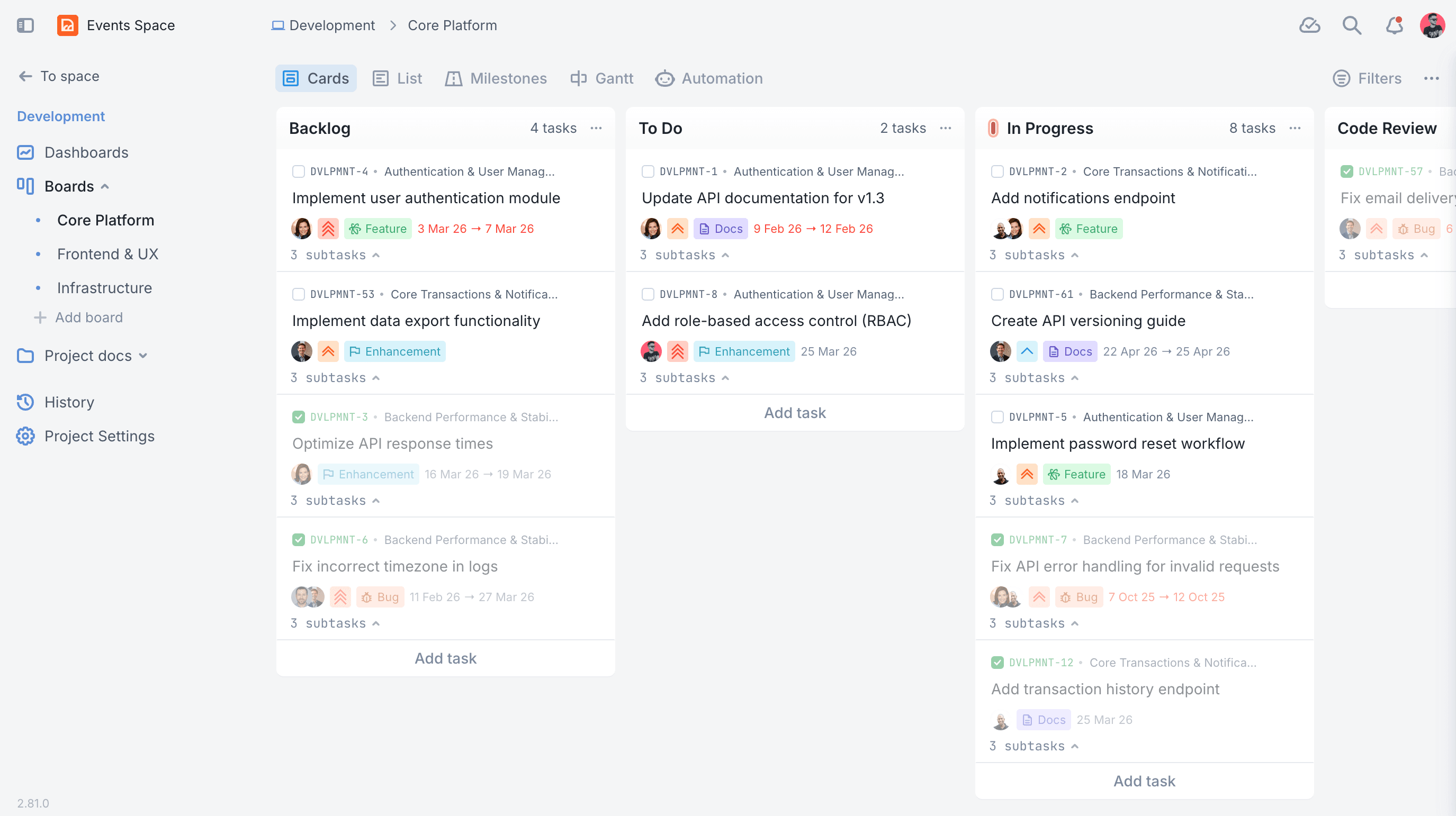
Vaiz gives Kanban teams a cleaner board with visible WIP control and less interface noise. That helps teams focus on flow and finishing work instead of managing the structure around it.
Pain points in kanban workflows
Kanban workflows break down when the system only tracks statuses while the real operating context lives elsewhere. Teams need the brief, the work item, the latest decision, and the supporting material to stay attached to the same record if they want the workflow to remain trustworthy.
The board also has to make the process legible at a glance. If people can move work between columns but still need to reconstruct what is blocked, what is ready, and what context matters from separate surfaces, the workflow stays visually tidy while operationally noisy.
In practice, teams usually need a repeatable flow with stages like ⚪️ Backlog, 🔵 Todo, 🟠 In progress (WIP ≤ 7), and 🕒 Hold. They also need enough structure to manage True Kanban flow with WIP limit on active work, Visual, easy scanning of stages, and Lightweight sizing for prioritization without turning the process into a patchwork of links, comments, and workaround fields.
Why Monday struggles in this workflow
Monday can offer a board view, but Kanban is not just columns on a screen. Teams need clarity, low visual friction, and a workflow that reinforces throughput instead of adding more board maintenance. Vaiz gives teams a more natural Kanban experience.
For kanban, teams usually need visible stages like ⚪️ Backlog, 🔵 Todo, 🟠 In progress (WIP ≤ 7), and 🕒 Hold and concrete support for True Kanban flow with WIP limit on active work, Visual, easy scanning of stages, and Lightweight sizing for prioritization. In Monday, that often turns into extra setup, naming conventions, and surrounding docs instead of a workflow that is purpose-built from day one. Teams also end up recreating structure for fields such as Other and Area.
That is why teams looking for a Monday alternative for kanban work are usually not searching for another visual board. They are trying to remove the admin layer that grows around the workflow once the real execution detail no longer fits cleanly inside the tool.
What the Vaiz template gives you out of the box
Vaiz starts with a ready-to-run kanban template instead of asking the team to rebuild the process from scratch. Classic Kanban flow with a strict WIP limit. Visualize work, reduce bottlenecks, and ship continuously.
A practical Kanban board that puts flow first: clear stages, quick visual scanning, and a hard WIP limit on In Progress to prevent overload.
The template also gives teams a cleaner starting point for fields such as Other and Area, so structure stays close to the work instead of leaking into side systems.
In Vaiz, this workflow comes ready out-of-the-box:
True Kanban flow with WIP limit on active work
Visual, easy scanning of stages
Lightweight sizing for prioritization
Area tags for filtering
Archive lane for clean boards + history
Classic Kanban flow with a strict WIP limit. Visualize work, reduce bottlenecks, and ship continuously.
Included columns: ⚪️ Backlog, 🔵 Todo, 🟠 In progress (WIP ≤ 7), 🕒 Hold, 🟣 Review, 🟢 Done, 🟤 Archived.
How to roll this workflow out in Vaiz
A practical rollout starts by mapping the current Monday statuses into the Vaiz template, importing the active work, and attaching the documents, assets, or references that teams currently keep outside the board. That gives the team one clean operational record instead of another migration placeholder.
Teams can then layer in workflow-specific fields such as Other and Area without recreating the whole system in side spreadsheets or docs.
Once the template is live, teams can adapt naming, task types, and automation rules to match their real process while keeping the workflow anchored in one system of record. That makes migration feel like controlled rollout, not a risky rebuild.
What this means for rollout: teams can move this workflow out of `Monday` and into a working Vaiz template without rebuilding the entire process from scratch.
Workflow FAQ
Get the Kanban workspace now
Switching from Monday takes courage. But our Migration Center transfers your tasks and history automatically in minutes.
Try Vaiz for freeNo credit card required. Automated migration from Monday.