Scrum
A ready-to-run Scrum board with ceremonies, sprint tracking, WIP limits, and engineering task categories.
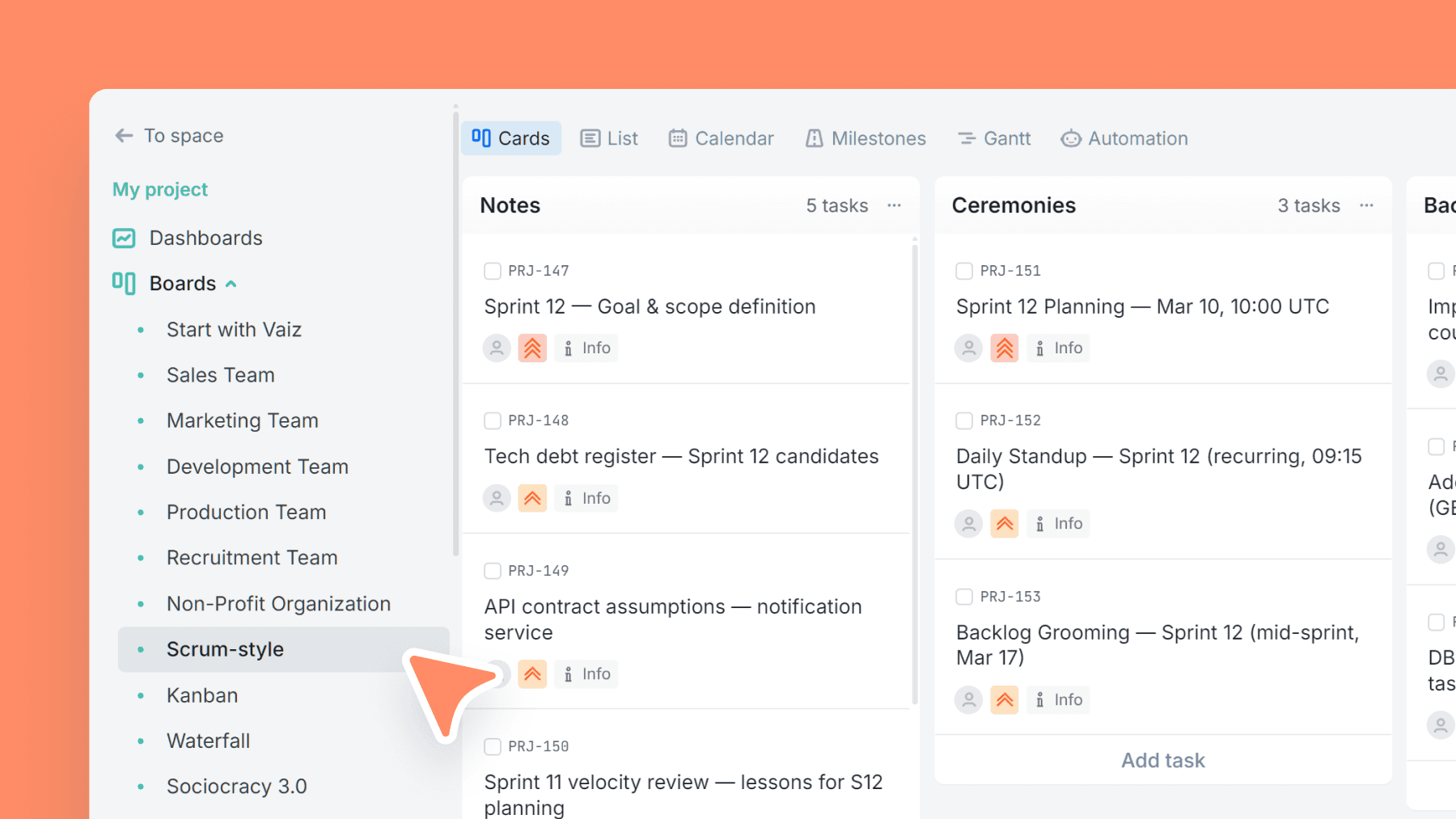
About this template
This template maps the Scrum rhythm into a board you can run immediately. It includes a Ceremonies lane (planning, standups, review, retro) plus a Sprint Results area to keep outcomes and learnings visible across cycles.
Active workflow columns have WIP limits to prevent overload and keep the team focused on finishing work before pulling more in.
Use Sprint Number plus Estimated/Logged time fields to track capacity and spot gaps between planning and reality — without overengineering your process.
What is a Scrum board template?
Scrum is an agile framework for managing and delivering work in short, structured cycles called sprints. Each sprint runs for one to four weeks and ends with a working, reviewable increment of the product. Work is planned at the start of each sprint, delivered during it, and reviewed at the end, creating a predictable rhythm that teams can improve over time.
Scrum is built around three roles, four ceremonies, and three artifacts. The roles are Product Owner, Scrum Master, and the Development Team. The ceremonies are Sprint Planning, Daily Scrum, Sprint Review, and Retrospective. The artifacts are the Product Backlog, Sprint Backlog, and Increment. A daily scrum meeting template, also called a standup, keeps the team synced on progress and blockers every day without long status meetings.
This template maps the Scrum rhythm directly onto the board. The Ceremonies column holds cards for every sprint ceremony, so rituals are tracked alongside the work itself. The Sprint Results column stores outcomes and learnings from each cycle, making it easier to review what changed between sprints. WIP limits on In Progress and Review prevent unfinished work from accumulating and keep the team focused on completing tasks before pulling in new ones.
Scrum and Kanban are both widely used agile frameworks, but they operate differently. Scrum runs in fixed-length sprints with structured ceremonies and defined roles. Kanban is a continuous flow with no sprint boundaries and no prescribed ceremonies. Scrum suits product development teams that benefit from a regular delivery cadence and structured feedback loops. Kanban suits operational and support teams where work arrives continuously and priorities shift frequently.
How this Scrum board is structured
Columns included
Task types
Custom fields
Key features
- Scrum-ready columns (incl. Ceremonies + Sprint Results)
- WIP limits on active stages to reduce overload
- Sprint number + Estimated vs Logged time fields
- Engineering task categories (Frontend/Backend/API/DevOps, etc.)
- Great for sprint planning and execution
Who is this template for?
- Scrum teams
- Agile software teams
- Product development teams
- Teams running sprints with reviews/retros
- Engineering squads needing better flow control
How to use this template
Use this board as your sprint operating system: plan the sprint, keep active work constrained, and review estimation accuracy at the end of each cycle.
Step 1
Sprint planning
Start in the Notes and Ceremonies columns. Use Notes for backlog prep, scope assumptions, and sprint goals. Use Ceremonies to create cards for Sprint Planning, Daily Scrum, Sprint Review, and Retrospective so the team can see the full rhythm of the sprint in one place.
Step 2
Execution and flow control
Move committed work through Todo, In progress, Review, Testing, and Done. Keep WIP limits visible on In progress and Review to prevent multitasking and half-finished work from piling up. This is what makes the board operational, not just visual: the team finishes work before pulling more.
Step 3
Tracking velocity
Use Sprint number together with Estimated time and Logged time to compare planned effort against actual effort. Review the gaps at the end of each sprint to improve forecasting, rebalance future commitments, and spot work that repeatedly takes longer than expected.
Related guides
Frequently asked questions
Related templates

Development team
A lightweight engineering board that keeps references and blockers visible — with flexible task categories and zero forced fields.

Kanban
Classic Kanban flow with a strict WIP limit — visualize work, reduce bottlenecks, and ship continuously.

Waterfall
A phase-based Waterfall template for fixed-scope projects — move work through requirements, design, build, QA, release, and maintenance with clear gates.